Built-in styles

Overview

Built-in styles are pre-defined style options that are displayed in the Design sidebar of Experiences. The full list of options can be found below.

1 'cfVisibility',
2 'cfHorizontalAlignment',
3 'cfVerticalAlignment',
4 'cfMargin',
5 'cfPadding',
6 'cfBackgroundColor',
7 'cfWidth',
8 'cfMaxWidth',
9 'cfHeight',
10 'cfImageAsset',
11 'cfImageOptions',
12 'cfBackgroundImageUrl',
13 'cfBackgroundImageOptions',
14 'cfFlexDirection',
15 'cfFlexWrap',
16 'cfFlexReverse',
17 'cfBorder',
18 'cfBorderRadius',
19 'cfGap',
20 'cfFontSize',
21 'cfFontWeight',
22 'cfLineHeight',
23 'cfLetterSpacing',
24 'cfTextColor',
25 'cfTextAlign',
26 'cfTextTransform',
27 'cfTextBold',
28 'cfTextItalic',
29 'cfTextUnderline',
30 'cfBackgroundImageScaling',
31 'cfBackgroundImageAlignment',
32 'cfBackgroundImageAlignmentVertical',
33 'cfBackgroundImageAlignmentHorizontal',

To stay up to date on the latest set of Built-in styles check CF_STYLE_ATTRIBUTES in the constants file in the Studio Core package source code.

Enable built-in styles

To enable built-in styles, first define and register a custom component and then add the builtInStyles property to the component definition like below.

1import type { ComponentDefinition } from '@contentful/experiences-sdk-react'
2
3export const subheadingComponentDefinition: ComponentDefinition = {
4 id: 'subheading',
5 name: 'Subheading',
6 category: 'Atoms',
7 builtInStyles: ['cfMargin', 'cfPadding', 'cfBackgroundColor'],
8 variables: {
9 text: {
10 displayName: 'Text',
11 type: 'Text',
12 defaultValue: 'Subheading',
13 },
14 variant: {
15 displayName: 'Variant',
16 type: 'Text',
17 defaultValue: 'dark',
18 group: 'style',
19 validations: {
20 in: [{ value: 'light' }, { value: 'dark' }]
21 }
22 }
23 }
24}

In the example above, by including the builtInStyles property in the definition we enable the following built-in styles:

  • Margin
  • Padding
  • Background

These built-in styles are displayed as options in the Design tab for the “Subheading” custom component.
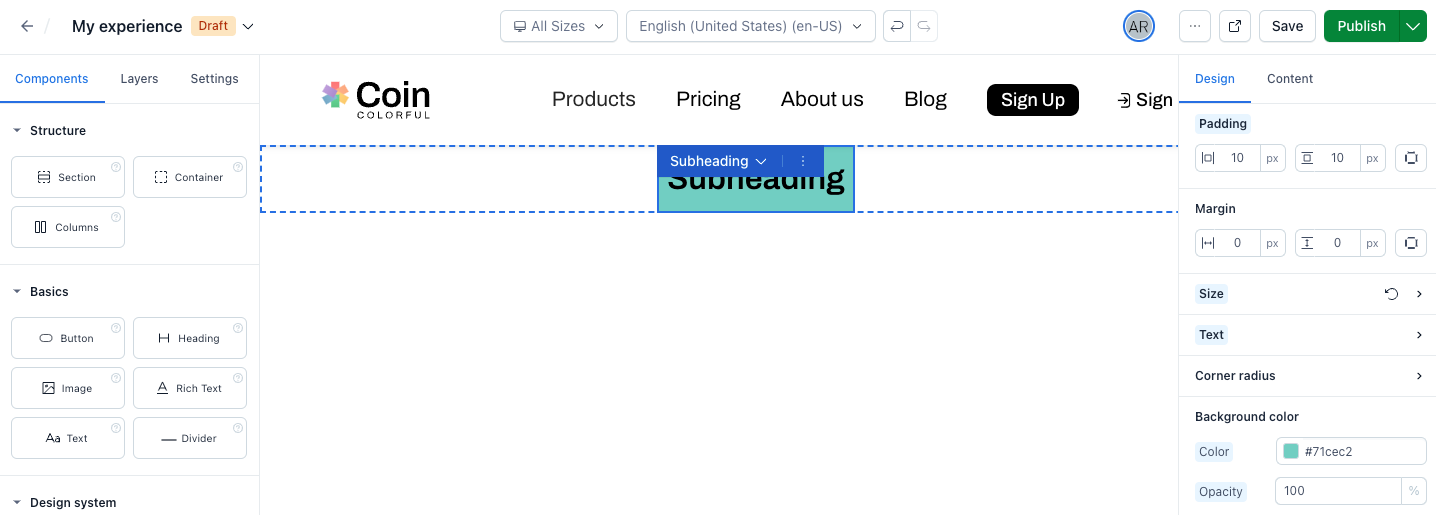
Experiences built-in styles applied

  • Margin widget is by default enabled for all components. You can set builtInStyles = [] to disable it.
  • The component needs to accept className property for this feature to work. Otherwise, the “Design” tab changes don’t affect the component.

Modifying the default value for built-in styles

Default values can be specified when using built-in styles in the component definition.

To use a built-in style with a custom default value:

  1. Remove the built-in style’s prop name from the builtInStyles array (otherwise the custom default value is ignored).
  2. Add the built-in style to the variables object as a key-value pair, where key is the style prop name and value is the full variable definition which includes your new defaultValue. The following example demonstrates a component definition that uses the built-in styles for margin and padding. The margin widget will be enabled with the standard default value, while the padding widget is enabled with a custom default value of '0 10px 0 10px':
1import type { ComponentDefinition } from '@contentful/experiences-sdk-react';
2
3const exampleComponentDefinition: ComponentDefinition = {
4 id: 'example',
5 name: 'Example',
6
7 // Enable the margin widget with its standard default value
8 builtInStyles: ['cfMargin'],
9
10 // Enable the padding widget with a custom default value
11 variables: {
12 cfPadding: {
13 displayName: 'Padding',
14 type: 'Text',
15 group: 'style',
16 defaultValue: '0 10px 0 10px'
17 }
18 }
19};