Combining external data with Experiences

Overview

Contentful is typically used as one among multiple data sources in a user’s systems. In a given experience (usually a full page), you might find youself pulling in and mixing together information from both Contentful and external data sources such as Product Information Management (PIM) systems, Digital Asset Management (DAM) systems, or similar systems for enhancing the user experience while preventing maintenance of the same data (e.g., pricing data) in multiple places.

This comprehensive guide demonstrates how to integrate external data sources with Contentful Experiences, showing you how to create custom components that can fetch and display data from third-party APIs while maintaining optimal performance through server-side rendering.

Architecture overview

The solution follows a hybrid approach that combines server-side and client-side data fetching to provide optimal performance for end users while maintaining a smooth editing experience in Contentful Studio.

Key components

  • Custom component in Studio with a variable for external system ID (e.g., PIM ID or SKU)
  • Server-side data extraction that analyzes the experience structure and fetches external data
  • Client-side fallback API for editor preview mode
  • React context for passing prefetched data to components
  • Caching layer to optimize performance and reduce API calls

Data flow

  1. End-user experience:
    1. Experience is fetched on the server side
    2. Product IDs are extracted
    3. External data is fetched
    4. Data is passed to components via context
  2. Editor experience:
    1. Experience is passed from Studio
    2. Components fetch data on the client side via API route
    3. Data is displayed with editor context

Prerequisites

Before starting this implementation, make sure you have:

The underlying concept and implementation solution will work with any tech stack, so this stack is just exemplary for demonstration purposes.

Understanding the Mock Shop integration

The example uses Shopify’s Mock Shop as a demonstration PIM system. This service provides:

  • GraphQL API: A complete GraphQL endpoint at https://mock.shop/api.
  • Sample product data: Pre-populated with realistic product information.
  • Product IDs: Simple numeric IDs that are converted to Shopify’s Global ID format (e.g., gid://shopify/Product/7982905098262).
  • Rich product data: Including titles, descriptions, price ranges, and featured images.

Available product IDs for testing

You can explore the full example product catalog by visiting the Mock Shop Playground and running queries such as the following.

1{
2 products(first: 10) {
3 edges {
4 node {
5 id
6 title
7 description
8 priceRange {
9 minVariantPrice {
10 amount
11 currencyCode
12 }
13 }
14 }
15 }
16 }
17}

Setting up the project structure

The example implementation follows this directory structure:

src/
├── app/
│ ├── api/
│ │ └── pim/
│ │ └── [id]/
│ │ └── route.ts
│ ├── [locale]/
│ │ └── [slug]/
│ │ ├── page.tsx
│ │ └── page.module.css
│ ├── layout.tsx
│ └── globals.css
├── components/
│ ├── PriceComponent.tsx
│ ├── PriceComponentRegistration.tsx
│ ├── ProductComponent.tsx
│ ├── ProductComponentRegistration.tsx
│ ├── ProductProvider.tsx
│ ├── Experience.tsx
│ └── types.ts
├── services/
│ └── pim.ts
├── utils/
│ ├── products.ts
│ └── format.ts
├── studio-config.ts
├── getExperience.ts
└── i18n.ts

Creating the PIM service layer

The example uses a dedicated service layer to handle all interactions with the external PIM system. This approach provides better separation of concerns and makes the code more maintainable. The typing is based on Mock Shop’s response structure, and you’ll need typing according to the external system you’re connecting to.

1// src/services/pim.ts
2import { useQuery } from '@tanstack/react-query';
3
4export const convertIdToPimId = (productId: string) =>
5 `gid://shopify/Product/${productId}`;
6
7export const convertPimIdToId = (pimId: string) =>
8 pimId.replace('gid://shopify/Product/', '');
9
10type ProductPrice = {
11 amount: string;
12 currencyCode: string;
13};
14
15type ProductPriceRange = {
16 minVariantPrice: ProductPrice;
17 maxVariantPrice: ProductPrice;
18};
19
20type ProductImage = {
21 id: string;
22 url: string;
23};
24
25export type ProductData = {
26 id: string;
27 title: string;
28 description: string;
29 priceRange: ProductPriceRange;
30 featuredImage: ProductImage;
31};
32
33type ProductApiResponse = {
34 product: ProductData;
35};
36
37type FetchResponse<T> = {
38 data: T;
39};
40
41/** Fetches the product data for a single product ID using GraphQL. */
42export const fetchProductData = async (
43 productId: string
44): Promise<ProductData> => {
45 const response = await fetch('https://mock.shop/api', {
46 body: JSON.stringify({
47 query: /* GraphQL */ `
48 {
49 product(id: "gid://shopify/Product/${productId}") {
50 id
51 title
52 description
53 priceRange {
54 minVariantPrice {
55 amount
56 currencyCode
57 }
58 maxVariantPrice {
59 amount
60 currencyCode
61 }
62 }
63 featuredImage {
64 id
65 url
66 }
67 }
68 }
69 `,
70 }),
71 method: 'POST',
72 headers: {
73 accept: 'application/json',
74 'content-type': 'application/json',
75 },
76 // Facilitate Next's built-in caching
77 cache: 'force-cache',
78 });
79
80 const result = (await response.json()) as FetchResponse<ProductApiResponse>;
81 return result.data.product;
82};
83
84/** Fetches all product data for a list of product IDs in a batch using GraphQL. */
85export const fetchProductsData = async (
86 productIds: string[]
87): Promise<ProductData[]> => {
88 const response = await fetch('https://mock.shop/api', {
89 body: JSON.stringify({
90 query: /* GraphQL */ `
91 query searchProducts($ids: [ID!]!) {
92 nodes(ids: $ids) {
93 ... on Product {
94 id
95 title
96 description
97 priceRange {
98 minVariantPrice {
99 amount
100 currencyCode
101 }
102 maxVariantPrice {
103 amount
104 currencyCode
105 }
106 }
107 featuredImage {
108 id
109 url
110 }
111 }
112 }
113 }
114 `,
115 variables: {
116 ids: Array.from(new Set(productIds)).map(convertIdToPimId),
117 },
118 }),
119 method: 'POST',
120 headers: {
121 accept: 'application/json',
122 'content-type': 'application/json',
123 },
124 // Facilitate Next's built-in caching
125 cache: 'force-cache',
126 });
127
128 const result = (await response.json()) as FetchResponse<{
129 nodes: ProductData[];
130 }>;
131
132 return result.data.nodes;
133};
134
135/** Fetches the product data for a single product ID via the dedicated API endpoint for client-side use. */
136export const fetchProductDataFromApi = async (
137 productId: string
138): Promise<ProductData> => {
139 const response = await fetch(`/api/pim/${productId}`);
140 if (!response.ok) {
141 throw new Error('Failed to fetch product data');
142 }
143 return response.json();
144};
145
146/** React Query hook for client-side product data fetching. */
147export const useClientSideProductData = (
148 productId: string,
149 enabled?: boolean
150) => {
151 return useQuery({
152 queryKey: ['product', productId],
153 queryFn: () => fetchProductDataFromApi(productId),
154 staleTime: 5 * 60 * 1000,
155 gcTime: 10 * 60 * 1000,
156 enabled: !!productId && enabled,
157 });
158};

Creating the product extraction utility

The product extraction utility analyzes the experience structure and extracts all external system IDs that need to be fetched.

Parsing the tree is NOT AN OFFICIALLY SUPPORTED strategy. We’re exploring having a standalone SDK method for this in a future version, so use/adapt the subsequent example implementation at your own risk.
1// src/utils/products.ts
2import { Experience } from '@contentful/experiences-sdk-react';
3import { EntityStore } from '@contentful/experiences-core';
4import { ComponentTreeNode } from '@contentful/experiences-core/types';
5import {
6 convertPimIdToId,
7 fetchProductsData,
8 ProductData,
9} from '../../../services/pim';
10
11const getProductNodes = (nodes: ComponentTreeNode[]): ComponentTreeNode[] =>
12 nodes.reduce((acc, node) => {
13 // Only pay attention to nodes with the right definition IDs of the relevant custom components
14 if (['custom-price', 'custom-product'].includes(node.definitionId)) {
15 acc.push(node);
16 }
17 // Recurse into children
18 if (node.children) {
19 acc.push(...getProductNodes(node.children));
20 }
21 return acc;
22 }, [] as ComponentTreeNode[]);
23
24const isValidProductId = (productId: unknown): productId is string => {
25 return typeof productId === 'string' && productId.length > 0;
26};
27
28export const extractProductIds = (
29 experience: Experience<EntityStore>
30): string[] => {
31 // Get all nodes with the right definition IDs of the relevant custom components
32 // Parsing the tree is a NOT OFFICIALLY SUPPORTED strategy.
33 // We're exploring having a standalone SDK method for this in a future version, so use at your own risk.
34 const nodes = getProductNodes(
35 experience?.entityStore?.experienceEntryFields?.componentTree.children ?? []
36 )
37 .map((node) => {
38 // Duck-type check for the right type of the custom variable
39 if (node.variables.product.type === 'UnboundValue') {
40 // Get the effective product ID from the unbound value store
41 const productId =
42 experience?.entityStore?.unboundValues[node.variables.product.key];
43 return productId?.value;
44 }
45
46 return undefined;
47 })
48 // Filter out invalid product IDs (e.g., `undefined` from above due to failed duck-type check or empty strings)
49 .filter(isValidProductId);
50
51 // Return unique product IDs to prevent overfetching
52 return Array.from(new Set(nodes));
53};
54
55export const fetchProducts = async (
56 productIds: string[]
57): Promise<Record<string, ProductData>> => {
58 // Fetch all products from the PIM system in a batch
59 const products = await fetchProductsData(productIds);
60
61 // Return a map of product IDs to product data for easy access using product IDs as keys
62 return Object.fromEntries(
63 await Promise.all(
64 products.map((product) => [convertPimIdToId(product.id), product])
65 )
66 );
67};

Building the API route for client-side fetching

In editor view, the experience does not get fetched on the server-side as for end users but gets communicated into the canvas view by Contentful instead. The whole experience will be null and fetching is a no-op function. So for editor mode, we need a client-side API route that can fetch individual product data on the fly. This ensures the editing experience matches the end-user experience.

1// src/app/api/pim/[id]/route.ts
2import type { NextRequest } from 'next/server';
3import { fetchProductData } from '../../../services/pim';
4
5export async function GET(
6 _req: NextRequest,
7 ctx: RouteContext<'/api/pim/[id]'>
8) {
9 const { id } = await ctx.params;
10 const product = await fetchProductData(id);
11 return Response.json(product);
12}

This simple API route leverages the existing PIM service to fetch product data. The service takes care of getting the required data from the third-party system, including potential authentication, proxying, other security measures, and data transformation, making the API route clean and focused.

Depending on data sensitivity, you may want to implement additional security guardrails such as a rate limiter to prevent facilitating scrapers accidentally.

Creating the custom components

The example includes two custom components: a PriceComponent for displaying product prices and a ProductComponent for displaying full product information. Both components handle both server-side prefetched data and client-side fetching for editor mode.

The purpose of having a Price custom component and Product custom component is to demonstrate that multiple custom components can be fed by the same external data.

Utility types

In the following components, we’re using a small utility type that applies to all Experience components and gets populated by the Experiences SDK automatically.

1export type CustomComponentProps<T> = T & {
2 className?: string;
3 isEditorMode?: boolean;
4};

Price component

Rendering

1// src/components/PriceComponent.tsx
2import { FC } from 'react';
3import { useFormatPrice } from '../../../utils/format';
4import { usePrefetchedProducts } from './ProductProvider';
5import { useClientSideProductData } from '../../../services/pim';
6
7type PriceComponentProps = {
8 productId: string;
9 isEditorMode?: boolean;
10};
11
12export const PriceComponent: FC<PriceComponentProps> = ({
13 productId,
14 isEditorMode,
15}) => {
16 const formatPrice = useFormatPrice();
17 // Get all prefetched products from the server side
18 const products = usePrefetchedProducts();
19 // Get the product data for the current product ID from the prefetched products
20 const product = products[productId];
21 // When in editor mode or we don't have the product data pre-fetched on the server side, we need to fetch it on the client side
22 const { data, isLoading } = useClientSideProductData(
23 productId,
24 // Enable for editor/canvas mode or if the product data was not prefetched on the server side properly
25 isEditorMode || !product
26 );
27 // Use the prefetched product data if available, otherwise use the client-side fetched data
28 const productData = product ?? data;
29
30 // Catch fresh instances of the component without a product ID being set yet (i.e. editor may be working on it still)
31 if (!productId) {
32 return 'TBD';
33 }
34
35 // Loading state in case the product data is being fetched on the client side
36 if (isLoading) {
37 return 'Fetching…';
38 }
39
40 // Last resort placeholder in case no product could be resolved both on the server side and client side for the given ID
41 if (!productData) {
42 return 'n/a';
43 }
44
45 // Get price from product data
46 const { priceRange } = productData;
47 const minPrice = parseFloat(priceRange.minVariantPrice.amount);
48 const maxPrice = parseFloat(priceRange.maxVariantPrice.amount);
49 const currency = priceRange.minVariantPrice.currencyCode;
50
51 return (
52 <>
53 {minPrice === maxPrice ? (
54 formatPrice(minPrice, currency)
55 ) : (
56 <>
57 {formatPrice(minPrice, currency)}-{formatPrice(maxPrice, currency)}
58 </>
59 )}
60 </>
61 );
62};

Custom component registration

1// src/components/PriceComponentRegistration.tsx
2import { ComponentRegistration } from '@contentful/experiences-sdk-react';
3import { Suspense } from 'react';
4import clsx from 'clsx';
5import { PriceComponent } from './PriceComponent';
6import styles from './PriceComponent.module.css';
7
8type PriceComponentProps = CustomComponentProps<{
9 product: string;
10}>;
11
12export const PriceComponentRegistration: ComponentRegistration = {
13 component: ({
14 className,
15 product,
16 isEditorMode,
17 // https://www.contentful.com/developers/docs/experiences/custom-components/#component-requirements
18 ...rest
19 }: PriceComponentProps) => {
20 return (
21 <div className={clsx(styles.price, className)} {...rest}>
22 <Suspense fallback={<div>Loading…</div>}>
23 <PriceComponent productId={product} isEditorMode={isEditorMode} />
24 {isEditorMode && <div className={styles.info}>{product}</div>}
25 </Suspense>
26 </div>
27 );
28 },
29 options: {
30 enableEditorProperties: {
31 isEditorMode: true,
32 },
33 wrapComponent: false,
34 },
35 definition: {
36 id: 'custom-price',
37 name: 'Price',
38 category: 'External Content',
39 variables: {
40 product: {
41 displayName: 'Product ID',
42 type: 'Text',
43 group: 'content',
44 },
45 },
46 },
47};

Product component

The product component utilizes the price component internally and displays additional data such as product titles and images.

Rendering

1// src/components/ProductComponent.tsx
2import { FC } from 'react';
3import { Card, Image, Tag, Flex } from 'antd';
4import { usePrefetchedProducts } from './ProductProvider';
5import { useClientSideProductData } from '../../../services/pim';
6import { PriceComponent } from './PriceComponent';
7
8type ProductComponentProps = {
9 productId: string;
10 isEditorMode?: boolean;
11};
12
13export const ProductComponent: FC<ProductComponentProps> = ({
14 productId,
15 isEditorMode,
16}) => {
17 const products = usePrefetchedProducts();
18 const product = products[productId];
19
20 // When in editor mode or we don't have the product data pre-fetched on the server side, we need to fetch it on the client side
21 const { data, isLoading } = useClientSideProductData(
22 productId,
23 isEditorMode || !product
24 );
25 const productData = product ?? data;
26
27 if (!productId) {
28 return <Card>TBD</Card>;
29 }
30
31 if (isLoading) {
32 return 'Fetching…';
33 }
34
35 if (!productData) {
36 return 'n/a';
37 }
38
39 return (
40 <Card
41 cover={
42 <Image src={productData.featuredImage.url} alt={productData.title} />
43 }
44 extra={isEditorMode ? <Tag>{productId}</Tag> : null}
45 >
46 <Flex gap="middle" vertical>
47 <Card.Meta
48 title={productData.title}
49 description={productData.description}
50 />
51 <PriceComponent productId={productId} isEditorMode={isEditorMode} />
52 </Flex>
53 </Card>
54 );
55};

Custom component registration

1// src/components/ProductComponentRegistration.tsx
2import { ComponentRegistration } from '@contentful/experiences-sdk-react';
3import clsx from 'clsx';
4import { ProductComponent } from './ProductComponent';
5
6type ProductComponentProps = CustomComponentProps<{
7 product: string;
8}>;
9
10export const ProductComponentRegistration: ComponentRegistration = {
11 component: ({
12 className,
13 product,
14 isEditorMode,
15 // https://www.contentful.com/developers/docs/experiences/custom-components/#component-requirements
16 ...rest
17 }: ProductComponentProps) => {
18 return (
19 <div className={clsx(className)} {...rest}>
20 <ProductComponent productId={product} isEditorMode={isEditorMode} />
21 </div>
22 );
23 },
24 options: {
25 enableEditorProperties: {
26 isEditorMode: true,
27 },
28 wrapComponent: false,
29 },
30 definition: {
31 id: 'custom-product',
32 name: 'Product',
33 category: 'External Content',
34 variables: {
35 product: {
36 displayName: 'Product ID',
37 type: 'Text',
38 group: 'content',
39 },
40 },
41 },
42};

Setting up the React context

The React context allows us to pass prefetched data from the server to client components efficiently.

1// src/components/ProductProvider.tsx
2'use client';
3
4import { createContext, FC, PropsWithChildren, useContext } from 'react';
5import { ProductData } from '../../../services/pim';
6
7const PrefetchedProductContext = createContext<Record<string, ProductData>>({});
8
9/** Returns a map of all prefetched products based on server-side extracted PIM data. */
10export const usePrefetchedProducts = () => useContext(PrefetchedProductContext);
11
12type PrefetchedProductProviderProps = PropsWithChildren<{
13 products: Record<string, ProductData>;
14}>;
15
16/** Provides a map of all prefetched products from the server side to the client component tree. */
17export const PrefetchedProductProvider: FC<PrefetchedProductProviderProps> = ({
18 children,
19 products,
20}: PrefetchedProductProviderProps) => {
21 return (
22 <PrefetchedProductContext.Provider value={products}>
23 {children}
24 </PrefetchedProductContext.Provider>
25 );
26};

Implementing the page component

The page component orchestrates the entire flow: fetching the experience, extracting product IDs, fetching external data, and rendering everything.

1// src/app/[locale]/[slug]/page.tsx
2import { Layout, LayoutHeader, LayoutContent, LayoutFooter } from 'antd';
3import { getExperience } from '../../../getExperience';
4import { extractProductIds, fetchProducts } from '../../../utils/products';
5import { detachExperienceStyles } from '@contentful/experiences-sdk-react';
6import { Experience } from '../../../components/Experience';
7import { Header } from '../../../components/Header';
8import { Footer } from '../../../components/Footer';
9import styles from './page.module.css';
10
11type Page = {
12 params: Promise<{ locale?: string; slug?: string; preview?: string }>;
13 searchParams: Promise<{ [key: string]: string | string[] | undefined }>;
14};
15
16export default async function ExperiencePage({ params, searchParams }: Page) {
17 const { locale = 'en-US', slug = 'home-page' } = (await params) || {};
18 const { isPreview, expEditorMode } = (await searchParams) || {};
19 const preview = isPreview === 'true';
20 const editorMode = expEditorMode === 'true';
21 const { experience, error } = await getExperience(
22 slug,
23 locale,
24 preview,
25 editorMode
26 );
27
28 if (error) {
29 return <>{error.message}</>;
30 }
31
32 // Extract product IDs from experience and fetch the products on the server side
33 const productIds = experience ? extractProductIds(experience) : [];
34 const products = await fetchProducts(productIds);
35
36 // Extract the styles from the experience
37 const stylesheet = experience ? detachExperienceStyles(experience) : null;
38
39 // Experience currently needs to be stringified manually to be passed to the component
40 const experienceJSON = experience ? JSON.stringify(experience) : null;
41
42 return (
43 <Layout className={styles.layout}>
44 {stylesheet && <style>{`{stylesheet}`}</style>}
45 <LayoutHeader className={styles.header}>
46 <Header />
47 </LayoutHeader>
48 <LayoutContent className={styles.content}>
49 <Experience
50 experienceJSON={experienceJSON}
51 locale={locale}
52 products={products}
53 />
54 </LayoutContent>
55 <LayoutFooter className={styles.footer}>
56 <Footer />
57 </LayoutFooter>
58 </Layout>
59 );
60}

Update your src/components/Experience.tsx to handle the editor mode:

1// src/components/Experience.tsx
2import React, { useState } from 'react';
3import { QueryClient, QueryClientProvider } from '@tanstack/react-query';
4import { ExperienceRoot } from '@contentful/experiences-sdk-react';
5import { PrefetchedProductProvider } from './ProductProvider';
6import { ProductData } from '../../../services/pim';
7
8interface ExperienceProps {
9 experienceJSON: string | null;
10 locale: string;
11 /** Pre-fetched products from the server side */
12 products: Record<string, ProductData>;
13}
14
15const Experience: React.FC<ExperienceProps> = ({
16 experienceJSON,
17 locale,
18 products,
19}) => {
20 const [queryClient] = useState(() => new QueryClient());
21
22 return (
23 <QueryClientProvider client={queryClient}>
24 <PrefetchedProductProvider products={products}>
25 <ExperienceRoot experience={experienceJSON} locale={locale} />
26 </PrefetchedProductProvider>
27 </QueryClientProvider>
28 );
29};

Registering the custom component

Finally, register your custom component with the Experiences SDK.

1// src/studio-config.ts
2import { defineComponents } from '@contentful/experiences-sdk-react';
3
4defineComponents([PriceComponentRegistration, ProductComponentRegistration]);

Testing the implementation

Testing end-user experience

To test the end-user experience:

  1. Create an experience in Contentful Studio.
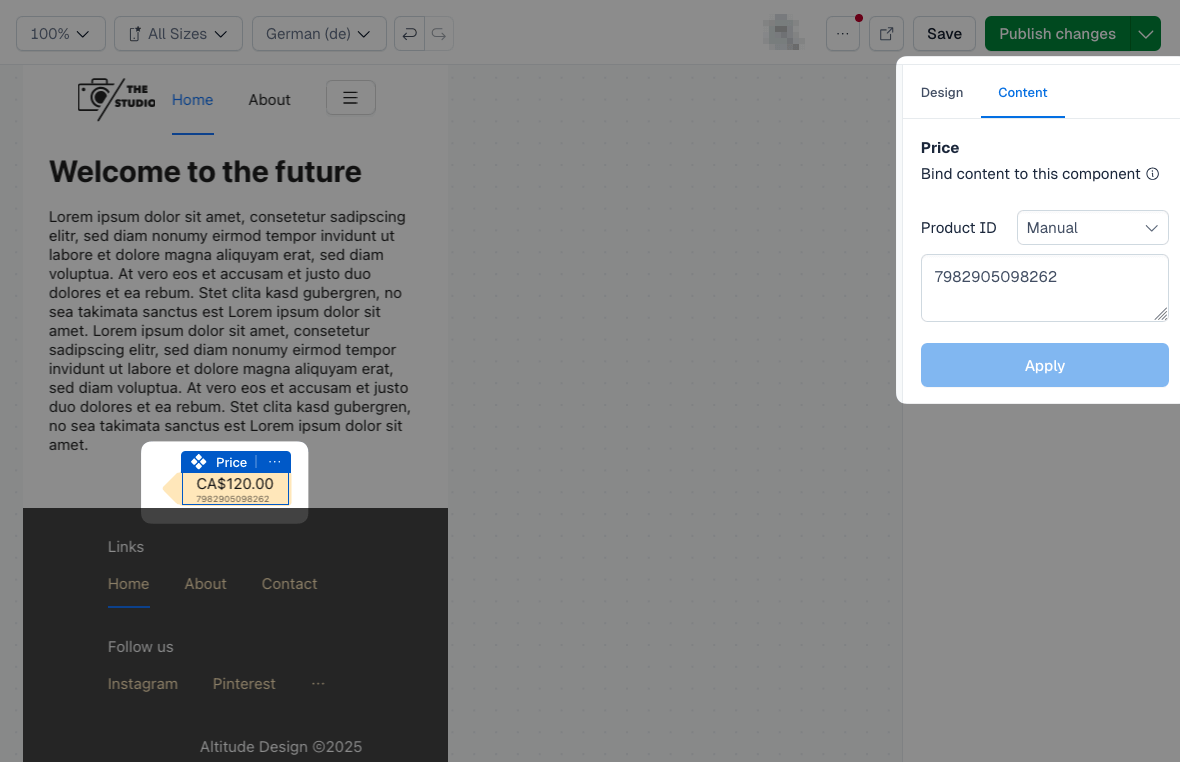
  2. Add the “Price” or “Product” component to your experience from the “External Content” category.
  3. Set a valid product ID (see Mock Shop examples).
  4. Publish the experience.
  5. Visit your site to see the product data rendered on the server-side.

The components will automatically:

  • Extract the product ID from the experience structure
  • Fetch product data from Mock Shop using GraphQL
  • Display the information with proper formatting

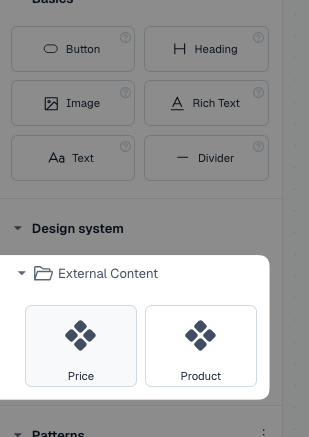
In editor mode, you’ll see:

  • Real product data fetched from Mock Shop
  • Editor overlays showing the product ID and title
  • Loading states while data is being fetched
  • Fallback messages if products aren’t found
Product custom component

Product component in canvas view

Caching considerations

The implementation includes several caching strategies:

Server-side caching

  • Next.js fetch caching: External API calls use Next.js built-in caching
  • API route caching: Client-side API routes include appropriate cache headers (if meaningful depending on the kind of data)

Client-side caching

  • React context: Prefetched data is passed via context to avoid re-fetching
  • Component state: Components cache fetched data in local state

Security considerations

API security

  • Rate limiting: Implement rate limiting on your API routes (to prevent facilitating scrapers accidentally)
  • Input validation: Validate all product IDs before making external requests
  • Error handling: Don’t expose sensitive error information

Conclusion

This implementation provides a robust solution for integrating external data sources with Contentful Experiences. The hybrid approach ensures optimal performance for end users while maintaining a smooth editing experience. The modular architecture makes it easy to extend and adapt for different external systems and use cases.

Key benefits of this approach

  • Performance: Server-side rendering with prefetched data
  • Flexibility: Works with any external API
  • Editor experience: Seamless editing with real data preview
  • Scalability: Efficient caching and parallel data fetching
  • Maintainability: Clean separation of concerns

For more advanced use cases, consider implementing additional features like:

  • Real-time updates: WebSocket connections for live data
  • Batch operations: Optimized bulk data fetching
  • Data transformation: Custom data mapping and formatting
  • Analytics: Tracking external API usage and performance