

Experience reference fields for metadata
Overview
Contentful Experiences typically have a title and slug, but for comprehensive page management, you often need additional metadata fields such as SEO descriptions, Open Graph tags, or other contextual information. This guide demonstrates how to enhance experiences with custom fields that can contain both static content and references to other entries, using SEO metadata as the primary example.
Architecture overview
The solution extends Contentful Experiences with custom fields that can contain both static values and references to other entries, providing a flexible metadata system for enhanced SEO and page context.
Key components
- Custom experience fields for metadata (e.g.,
metaTitle,metaDescription) - Reference support for linking to other content entries
- Metadata extraction utilities that handle both static and referenced values
- Next.js metadata integration using
generateMetadatafunction - Type-safe field access with proper fallbacks
Data flow
- Content model setup: Define custom fields on the experience content type
- Content creation: Editors populate fields with static values or references
- Metadata extraction: Server-side utilities extract values from experience
- SEO integration: Next.js
generateMetadatafunction uses extracted values - Fallback handling: Graceful degradation when fields are empty
Prerequisites
Before starting this implementation, make sure you have:
- A Next.js project with App Router
- Contentful Experiences SDK installed (
@contentful/experiences-sdk-react) - Access to Contentful Studio for content model configuration
- Basic understanding of Next.js metadata API
- Familiarity with Contentful content types and references
Setting up the content model
The first step is to enhance your experience content type with custom fields for metadata. This example focuses on SEO-related fields, but the same pattern can be applied to any metadata needs.
Required fields
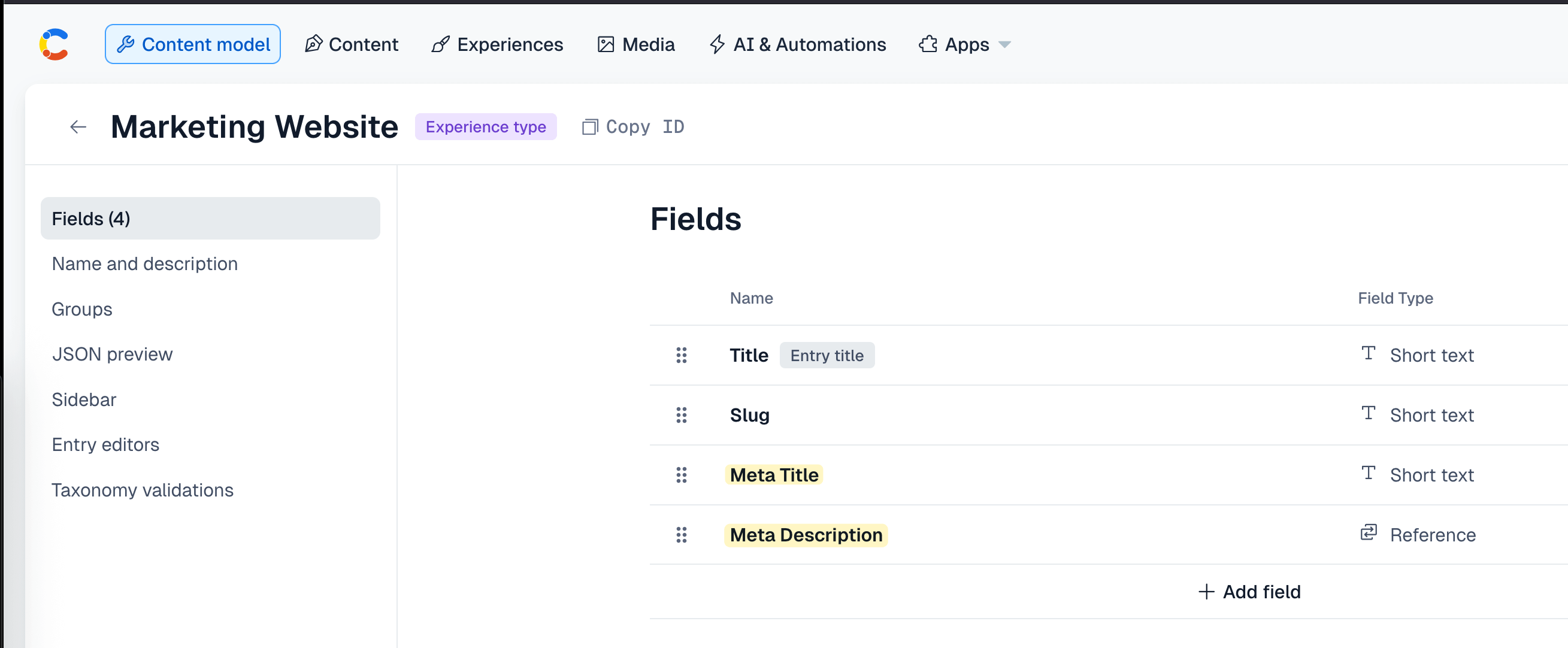
Add the following fields to your experience content type:
metaTitle(Short text) - Custom page title for SEOmetaDescription(Short text or Reference) - SEO description
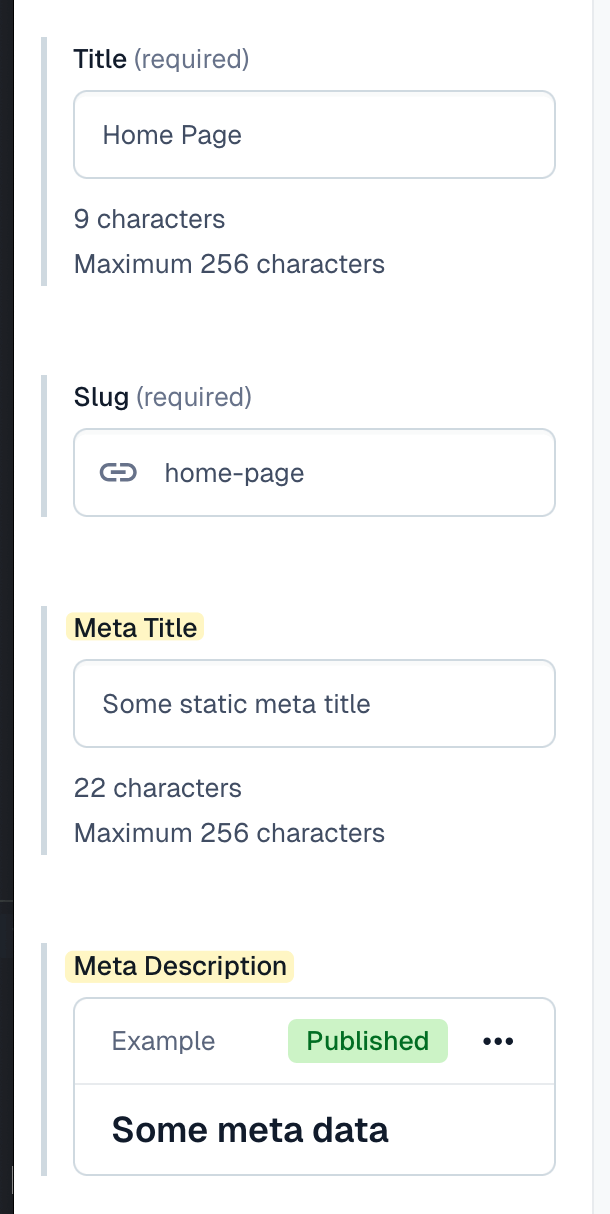
This way editors can maintain those metadata fields directly in the editor view when working on experiences.
Field configuration
Configure your fields with appropriate validation and help text:
- Set field IDs that match your extraction logic
- Use appropriate field types (Short text, Long text, Media, Reference)
- Add validation rules for required fields
- Provide clear help text for content editors
Creating the metadata extraction utilities
The core of this solution is a set of utility functions that can extract metadata from experiences, handling both static values and references to other entries.
Key features of the extraction utilities
- Reference support: Automatically resolves references to other entries
- Fallback handling: Uses experience title as fallback for meta title
- Type safety: Proper type checking for different content types
- Flexible field access: Works with any custom field name
Implementing the page component with metadata
The page component integrates the metadata extraction with Next.js’s generateMetadata function to provide proper SEO support.
Key features of the page implementation
- Server-side metadata generation: Uses Next.js
generateMetadatafor optimal SEO - Preview support: Handles both published and preview content
- Fallback handling: Graceful degradation when metadata is missing
- Open Graph integration: Automatic Open Graph tag generation
Handling referenced content
When using references in your metadata fields, the system needs to know how to extract values from different content types. This is handled in the getFieldValueFromEntry function.
Content type mapping
Testing the implementation
Testing metadata generation
To test the metadata generation:
- Create an experience in Contentful Studio.
- Populate the custom metadata fields with both static values and references.
- Publish the experience.
- Visit your site and inspect the page source to verify metadata.
Testing with references
To test metadata with references:
- Create referenced content entries (e.g., SEO descriptions, authors).
- Link these entries to your experience metadata fields.
- Verify that the referenced content appears in the generated metadata.
- Test with different content types to ensure proper value extraction.
Preview mode testing
To test metadata in preview mode:
- Create draft content with custom metadata.
- Use preview mode to verify metadata is correctly displayed.
- Test both static values and references in preview mode.
Type safety considerations
ExperienceFields type currently only provides typing for slug and title, so additional fields are currently validated at run time.Conclusion
This implementation provides a robust solution for enhancing Contentful Experiences with custom metadata fields. The flexible architecture supports both static values and references, making it suitable for various SEO and metadata needs.
Key benefits of this approach
- Flexibility: Supports both static values and references
- SEO optimization: Proper metadata generation for search engines
- Content reusability: Reference system allows content reuse
- Type safety: Proper handling of different content types
- Maintainability: Clean separation of concerns
For more advanced use cases, consider implementing additional features like:
- Dynamic metadata: Context-aware metadata generation
- A/B testing: Multiple metadata variants for testing
- Analytics integration: Metadata tracking and optimization
- Multi-language support: Localized metadata handling