Texte enrichi
Que sont les commandes de texte enrichi ?

Les commandes de texte enrichi sont une fonctionnalité complémentaire visant à améliorer l’efficacité des éditeurs travaillant avec du contenu structuré dans l’éditeur de texte enrichi. Cette fonctionnalité permet à l’utilisateur d’intégrer rapidement des entrées et des ressources à l’aide d’un panneau de commande sans quitter le contexte de l’éditeur ou le clavier. Le panneau de commande s’ouvre dès que l’utilisateur tape « / » (barre oblique sur le clavier), fournissant une palette de commandes au fur et à mesure que l’utilisateur continue à taper.
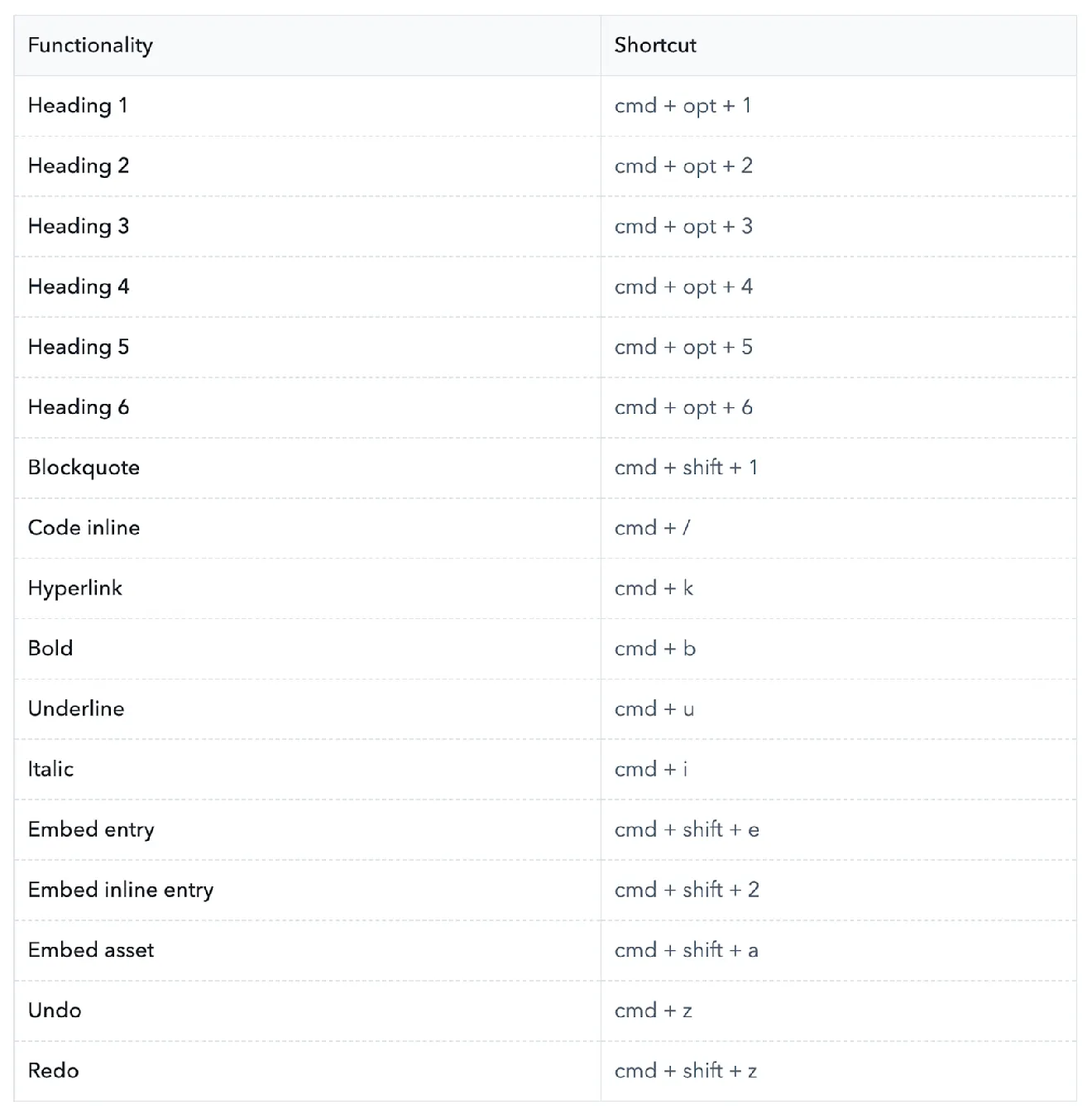
Quels sont les raccourcis clavier pour l’éditeur de texte enrichi ?
What is the difference between an "Embed inline entry" and a "Hyperlink to an entry"?
Even though in the API response both of these features seem similar, the difference lies in the intended usage.
A hyperlink to an entry is still a hyperlink which is wrapped around a string and will take you to another page if you click on it.
An embedded inline entry is not wrapped around a string and you (or your developer) can choose what and if you want to render something there.
Here are some use cases of an inline entry that might help differentiate it with a hyperlink to an entry:
A reusable term, like brand name, across many pages.
An annotation modal over a term.
A user mention.
What is the difference between "Embed block entry" and "Embed inline entry"?
They both do the same thing: embed (or "link" as we say in Contentful jargon) an entry within your flow of text so that this gets rendered in your application as a widget. The difference between them is in the possible widget that will show up:
For inline entries you might get things like word annotations, or dynamic microcopy
For block entries you might get widgets like image carousels, embedded social media posts, sign up forms, related products and more.