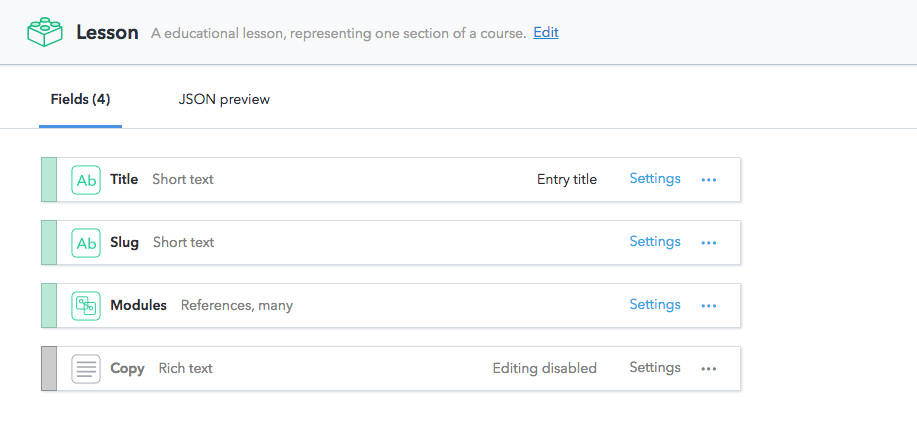
Migrate content to Rich Text

The objective of this guide is to migrate your existing content to Rich Text. The existing content exists in the following form:

To explain the steps involved in content migration effectively, the Example App is referred. The Example App uses a Content model that has content pertaining to both the forms mentioned above. Thereby, providing a perfect platform to perform the following transformations for the entries of content types:

  • “Lesson > Copy” -> “Rich Text” text
  • “Lesson > Image” -> “Rich Text” Embedded Asset
  • “Lesson > Code Snippet” -> “Rich Text” Embedded Entry

that are linked from “Lesson” entries.
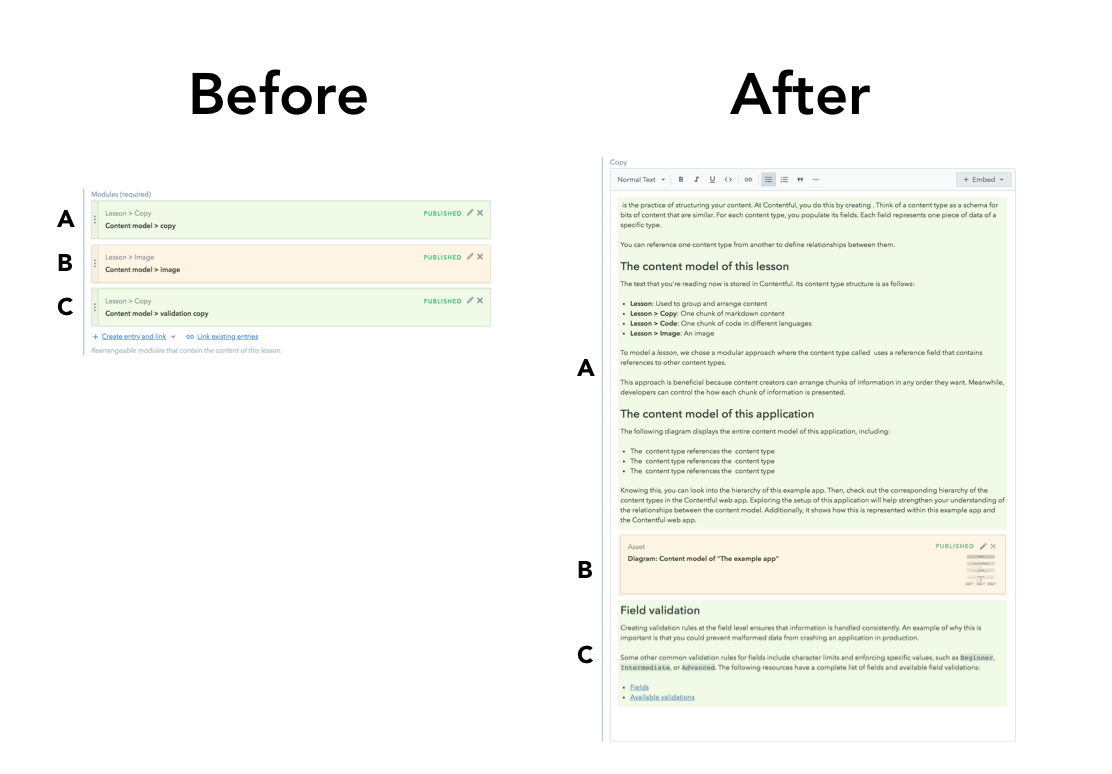
Before and after image of Rich Text

Prerequisites

  • Knowledge of JavaScript and familiarity with Contentful’s migration tooling.
  • The migration tool installed in your machine.
  • A sandbox environment (available from micro spaces and above).

1. Create an Example app

To replicate the Example app, create a sample space with this Content model first:
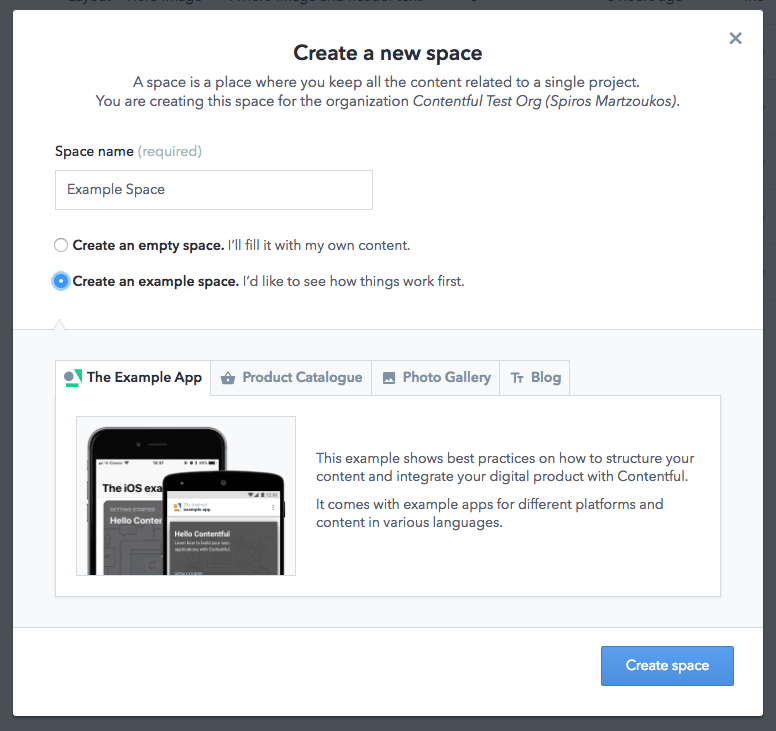
Image of an example app space

Here you can navigate to an entry of “Lesson” Content-Type, similar to the one explaining how content modeling works:
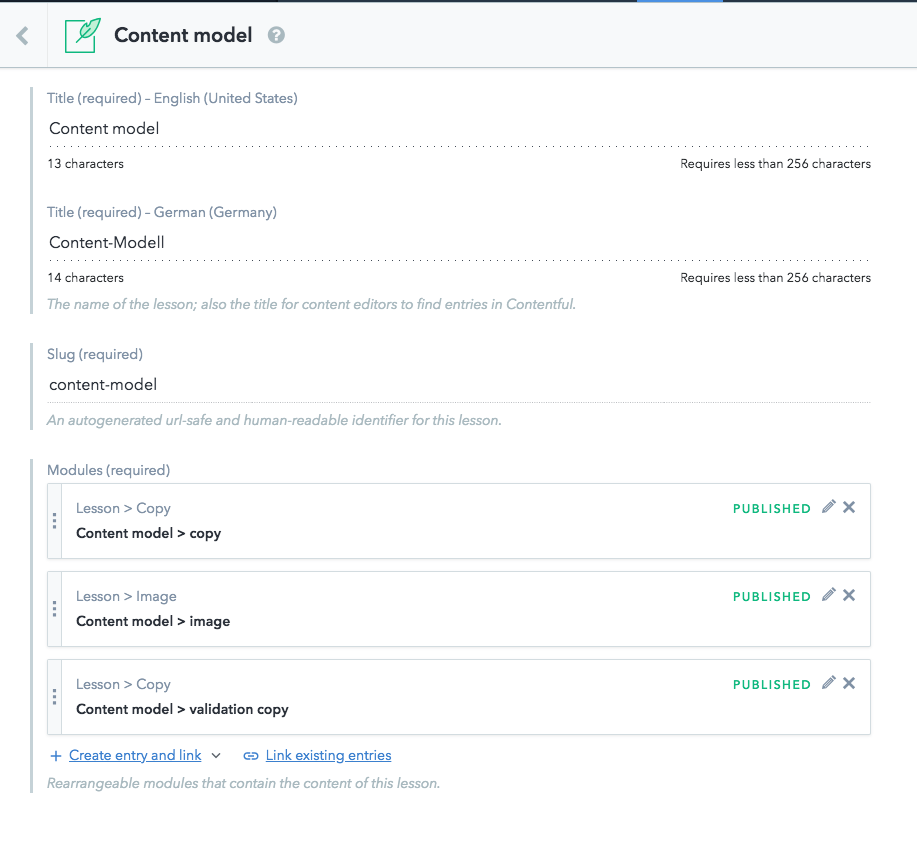
Image example of a content model

2. Create a sandbox environment

To mitigate the risk of making changes that hamper your production application, create a new sandbox environment. Let’s call this “rich-text-migration”:
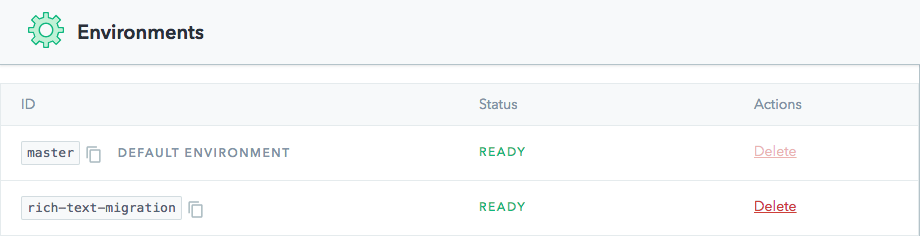
Example sandbox image of Rich Text migration

3. Add a Rich Text field

Image of a variety of fields including Rich Text within Contentful

This can also be done with the migration script. In this case, the UI is used to keep the code sample light and focused on migration only logic.

4. Create the migration file

You can skip all the intermediate steps and go straight to step 10 to access the final file of the migration.

Following is the shell for the migration file:

1module.exports = function(migration) {
2 migration.transformEntries({
3 contentType: 'lesson',
4 from: ['modules'],
5 to: ['copy'],
6 transformEntryForLocale: function(fromFields) {
7 // <-- Logic for migration will go here
8 return {};
9 }
10 });
11};

The objective of the next steps is to change the “lesson” content type by:

  • transforming the content of the “modules” field content to Rich Text format and,
  • export it (currently an empty object is exported) to the newly created “Copy” field.

5. Get the linked Modules for the current Lesson

While iterating over the different entries, you might first need a collection of the Modules that are linked by your “Modules” field. The following code gets the linked Modules:

1module.exports = function(migration, { makeRequest }) {
2 migration.transformEntries({
3 contentType: 'lesson',
4 from: ['modules'],
5 to: ['copy'],
6 transformEntryForLocale: async function(fromFields) {
7 // Get the "Lesson > *" modules that are linked to the "modules" field
8 // the modules field itself isn't localized, but some of the links contained in the array point to localizable entries.
9 const moduleIDs = fromFields.modules['en-US'].map(e => e.sys.id);
10 const moduleEntries = await makeRequest({
11 method: 'GET',
12 url: `/entries?sys.id[in]=${moduleIDs.join(',')}`
13 });
14 // Filter down to just these Lessons linked by the current entry
15 const linkedModuleEntries = moduleIDs.map(id =>
16 moduleEntries.items.find(entry => entry.sys.id === id)
17 );
18
19 return {};
20 }
21 });
22};

6. Convert “Lesson > Image” entries to Rich Text images

As Rich Text supports images, we can take the “media” field of the linked “Lesson > Image” entries and turn that into a Rich Text embedded asset. There is already some conditional logic on the content type id of the linked module but for now, the Rich Text field with images is populated.

1const _ = require('lodash');
2
3module.exports = function(migration, { makeRequest }) {
4 migration.transformEntries({
5 contentType: 'lesson',
6 from: ['modules'],
7 to: ['copy'],
8 transformEntryForLocale: async function(fromFields) {
9 // Get the "Lesson > *" modules that are linked to the "modules" field
10 // the modules field itself isn't localized, but some of the links contained in the array point to localizable entries.
11 const moduleIDs = fromFields.modules['en-US'].map(e => e.sys.id);
12 const moduleEntries = await makeRequest({
13 method: 'GET',
14 url: `/entries?sys.id[in]=${moduleIDs.join(',')}`
15 });
16 // Filter down to just these Lessons linked by the current entry
17 const linkedModuleEntries = moduleIDs.map(id =>
18 moduleEntries.items.find(entry => entry.sys.id === id)
19 );
20
21 const allNodeArrays = await Promise.all(
22 linkedModuleEntries.map(linkedModule => {
23 return transformLinkedModule(linkedModule, currentLocale);
24 })
25 );
26
27 // The content property of the Rich Text document is an array of paragraphs, embedded entries, embedded assets.
28 const content = _.flatten(allNodeArrays);
29
30 // The returned Rich Text object to be added to the new "copy" field
31 const result = {
32 copy: {
33 nodeType: 'document',
34 content: contentArray,
35 data: {}
36 }
37 };
38 return result;
39
40 // This will have logic for the other linkedModule types like Lesson > Code Snippets and Lesson > Copy
41 function transformLinkedModule(linkedModule) {
42 switch (linkedModule.sys.contentType.sys.id) {
43 case 'lessonImage':
44 return embedImageBlock(linkedModule);
45 }
46 }
47
48 // Return a Rich Text embedded asset object
49 function embedImageBlock(lessonImage) {
50 // This field is not localized.
51 const asset = lessonImage.fields.image['en-US'];
52 return [
53 {
54 nodeType: 'embedded-asset-block',
55 content: [],
56 data: {
57 target: {
58 sys: {
59 type: 'Link',
60 linkType: 'Asset',
61 id: asset.sys.id
62 }
63 }
64 }
65 }
66 ];
67 }
68 }
69 });
70};

7. Convert “Lesson > Code Snippets” entries to Rich Text embedded entries

The “Lesson > Code Snippets” entries are embedded as entries instead of assets:

1const _ = require('lodash');
2
3module.exports = function(migration, { makeRequest }) {
4 migration.transformEntries({
5 contentType: 'lesson',
6 from: ['modules'],
7 to: ['copy'],
8 transformEntryForLocale: async function(fromFields) {
9 // Get the "Lesson > *" modules that are linked to the "modules" field
10 // the modules field itself isn't localized, but some of the links contained in the array point to localizable entries.
11 const moduleIDs = fromFields.modules['en-US'].map(e => e.sys.id);
12 const moduleEntries = await makeRequest({
13 method: 'GET',
14 url: `/entries?sys.id[in]=${moduleIDs.join(',')}`
15 });
16 // Filter down to just these Lessons linked by the current entry
17 const linkedModuleEntries = moduleIDs.map(id =>
18 moduleEntries.items.find(entry => entry.sys.id === id)
19 );
20
21 const allNodeArrays = await Promise.all(
22 linkedModuleEntries.map(linkedModule => {
23 return transformLinkedModule(linkedModule, currentLocale);
24 })
25 );
26
27 // The content property of the Rich Text document is an array of paragraphs, embedded entries, embedded assets.
28 const content = _.flatten(allNodeArrays);
29
30 // The returned Rich Text object to be added to the new "copy" field
31 const result = {
32 copy: {
33 nodeType: 'document',
34 content: contentArray,
35 data: {}
36 }
37 };
38 return result;
39
40 // This will have logic for the other linkedModule types like Lesson > Copy
41 function transformLinkedModule(linkedModule) {
42 switch (linkedModule.sys.contentType.sys.id) {
43 case 'lessonImage':
44 return embedImageBlock(linkedModule);
45 case 'lessonCodeSnippets':
46 return embedCodeSnippet(linkedModule);
47 }
48 }
49
50 // Return a Rich Text embedded asset object
51 function embedImageBlock(lessonImage) {
52 // This field is not localized.
53 const asset = lessonImage.fields.image['en-US'];
54 return [
55 {
56 nodeType: 'embedded-asset-block',
57 content: [],
58 data: {
59 target: {
60 sys: {
61 type: 'Link',
62 linkType: 'Asset',
63 id: asset.sys.id
64 }
65 }
66 }
67 }
68 ];
69 }
70 // Return a Rich Text embedded entry object
71 function embedCodeSnippet(lessonCodeSnippet) {
72 return [
73 {
74 nodeType: 'embedded-entry-block',
75 content: [],
76 data: {
77 target: {
78 sys: {
79 type: 'Link',
80 linkType: 'Entry',
81 id: lessonCodeSnippet.sys.id
82 }
83 }
84 }
85 }
86 ];
87 }
88 }
89 });
90};

8. Convert the Markdown text in “Lesson > Copy” to Rich Text

In this step, the Markdown text is transformed using the rich-text-from-markdown tool.

In order to install it, run:

$npm i @contentful/rich-text-from-markdown

Then, update your migration script:

1const _ = require('lodash');
2
3const { richTextFromMarkdown } = require('@contentful/rich-text-from-markdown');
4
5module.exports = function(migration, { makeRequest }) {
6 migration.transformEntries({
7 contentType: 'lesson',
8 from: ['modules'],
9 to: ['copy'],
10 transformEntryForLocale: async function(fromFields) {
11 // the modules field itself isn't localized, but some of the links contained in the array point to localizable entries.
12 const moduleIDs = fromFields.modules['en-US'].map(e => e.sys.id);
13 const moduleEntries = await makeRequest({
14 method: 'GET',
15 url: `/entries?sys.id[in]=${moduleIDs.join(',')}`
16 });
17 // Filter down to just these Lessons linked by the current entry
18 const linkedModuleEntries = moduleIDs.map(id =>
19 moduleEntries.items.find(entry => entry.sys.id === id)
20 );
21
22 const allNodeArrays = await Promise.all(
23 linkedModuleEntries.map(linkedModule => {
24 return transformLinkedModule(linkedModule, currentLocale);
25 })
26 );
27
28 // The content property of the Rich Text document is an array of paragraphs, embedded entries, embedded assets.
29 const content = _.flatten(allNodeArrays);
30
31 // The returned Rich Text object to be added to the new "copy" field
32 const result = {
33 copy: {
34 nodeType: 'document',
35 content: contentArray,
36 data: {}
37 }
38 };
39 return result;
40
41 async function transformLinkedModule(linkedModule, locale) {
42 switch (linkedModule.sys.contentType.sys.id) {
43 case 'lessonCopy':
44 const richTextDocument = await transformLessonCopy(
45 linkedModule,
46 locale
47 );
48 return richTextDocument.content;
49 case 'lessonImage':
50 return embedImageBlock(linkedModule);
51 case 'lessonCodeSnippets':
52 return embedCodeSnippet(linkedModule);
53 }
54 }
55
56 // Return Rich Text instead of Markdown
57 async function transformLessonCopy(lessonCopy, locale) {
58 const copy = lessonCopy.fields.copy[locale];
59 return await richTextFromMarkdown(copy);
60 }
61 // Return a Rich Text embedded asset object
62 function embedImageBlock(lessonImage) {
63 // This field is not localized.
64 const asset = lessonImage.fields.image['en-US'];
65 return [
66 {
67 nodeType: 'embedded-asset-block',
68 content: [],
69 data: {
70 target: {
71 sys: {
72 type: 'Link',
73 linkType: 'Asset',
74 id: asset.sys.id
75 }
76 }
77 }
78 }
79 ];
80 }
81 // Return a Rich Text embedded entry object
82 function embedCodeSnippet(lessonCodeSnippet) {
83 return [
84 {
85 nodeType: 'embedded-entry-block',
86 content: [],
87 data: {
88 target: {
89 sys: {
90 type: 'Link',
91 linkType: 'Entry',
92 id: lessonCodeSnippet.sys.id
93 }
94 }
95 }
96 }
97 ];
98 }
99 }
100 });
101};

9. Convert the Markdown text with images

This section explains how to transform Markdown text with images to the Rich Text Document with embedded assets.

To get started, update your migration script for Lesson > Copy:

1const mimeType = {
2 bmp: 'image/bmp',
3 djv: 'image/vnd.djvu',
4 djvu: 'image/vnd.djvu',
5 gif: 'image/gif',
6 jpeg: 'image/jpeg',
7 jpg: 'image/jpeg',
8 pbm: 'image/x-portable-bitmap',
9 pgm: 'image/x-portable-graymap',
10 png: 'image/png',
11 pnm: 'image/x-portable-anymap',
12 ppm: 'image/x-portable-pixmap',
13 psd: 'image/vnd.adobe.photoshop',
14 svg: 'image/svg+xml',
15 svgz: 'image/svg+xml',
16 tif: 'image/tiff',
17 tiff: 'image/tiff',
18 xbm: 'image/x-xbitmap',
19 xpm: 'image/x-xpixmap',
20 '': 'application/octet-stream'
21};
22const getContentType = url => {
23 const index = url.lastIndexOf('.');
24 const extension = index === -1 ? '' : url.substr(index + 1);
25 return mimeType[extension];
26};
27const getFileName = url => {
28 const index = url.lastIndexOf('/');
29 const fileName = index === -1 ? '' : url.substr(index + 1);
30 return fileName;
31};
32
33// Return Rich Text instead of Markdown
34async function transformLessonCopy(lessonCopy, locale) {
35 const copy = lessonCopy.fields.copy[locale];
36 return await richTextFromMarkdown(copy, async mdNode => {
37 if (mdNode.type !== 'image') {
38 return null;
39 }
40 // Create and asset and publish it
41 const space = await managementClient.getSpace(spaceId);
42 // Unfortunately, we can't pull the environment id from the context
43 const environment = await space.getEnvironment('rich-text-migration');
44
45 let asset = await environment.createAsset({
46 fields: {
47 title: {
48 'en-US': mdNode.title ? mdNode.title + locale : mdNode.alt + locale
49 },
50 file: {
51 'en-US': {
52 contentType: getContentType(mdNode.url),
53 fileName: getFileName(mdNode.url) + locale,
54 upload: `https:${mdNode.url}`
55 }
56 }
57 }
58 });
59 asset = await asset.processForAllLocales({
60 processingCheckWait: 4000
61 });
62 asset = await asset.publish();
63 console.log(`published asset's id is ${asset.sys.id}`);
64 return {
65 nodeType: 'embedded-asset-block',
66 content: [],
67 data: {
68 target: {
69 sys: {
70 type: 'Link',
71 linkType: 'Asset',
72 id: asset.sys.id
73 }
74 }
75 }
76 };
77 });
78}

10. Markdown migration script

Let’s combine all pieces of the puzzle in one script:

1const richTextFromMarkdown = require('@contentful/rich-text-from-markdown')
2 .richTextFromMarkdown;
3const _ = require('lodash');
4const { createClient } = require('contentful-management');
5
6const mimeType = {
7 bmp: 'image/bmp',
8 djv: 'image/vnd.djvu',
9 djvu: 'image/vnd.djvu',
10 gif: 'image/gif',
11 jpeg: 'image/jpeg',
12 jpg: 'image/jpeg',
13 pbm: 'image/x-portable-bitmap',
14 pgm: 'image/x-portable-graymap',
15 png: 'image/png',
16 pnm: 'image/x-portable-anymap',
17 ppm: 'image/x-portable-pixmap',
18 psd: 'image/vnd.adobe.photoshop',
19 svg: 'image/svg+xml',
20 svgz: 'image/svg+xml',
21 tif: 'image/tiff',
22 tiff: 'image/tiff',
23 xbm: 'image/x-xbitmap',
24 xpm: 'image/x-xpixmap',
25 '': 'application/octet-stream'
26};
27const getContentType = url => {
28 const index = url.lastIndexOf('.');
29 const extension = index === -1 ? '' : url.substr(index + 1);
30 return mimeType[extension];
31};
32const getFileName = url => {
33 const index = url.lastIndexOf('/');
34 const fileName = index === -1 ? '' : url.substr(index + 1);
35 return fileName;
36};
37
38const ENV_NAME = 'rich-text-migration';
39
40module.exports = function(migration, { makeRequest, spaceId, accessToken }) {
41 const managementClient = createClient({ accessToken: accessToken });
42
43 migration.transformEntries({
44 contentType: 'lesson',
45 from: ['modules'],
46 to: ['copy'],
47 transformEntryForLocale: async function(fromFields, currentLocale) {
48 // Get the "Lesson > *" modules that are linked to the "modules" field
49 // the modules field itself isn't localized, but some of the links contained in the array point to localizable entries.
50 const moduleIDs = fromFields.modules['en-US'].map(e => e.sys.id);
51 const moduleEntries = await makeRequest({
52 method: 'GET',
53 url: `/entries?sys.id[in]=${moduleIDs.join(',')}`
54 });
55 // Filter down to just these Lessons linked by the current entry
56 const linkedModuleEntries = moduleIDs.map(id =>
57 moduleEntries.items.find(entry => entry.sys.id === id)
58 );
59
60 const allNodeArrays = await Promise.all(
61 linkedModuleEntries.map(linkedModule => {
62 return transformLinkedModule(linkedModule, currentLocale);
63 })
64 );
65
66 // The content property of the Rich Text document is an array of paragraphs, embedded entries, embedded assets.
67 const content = _.flatten(allNodeArrays);
68
69 // The returned Rich Text object to be added to the new "copy" field
70 var result = {
71 copy: {
72 nodeType: 'document',
73 content: content,
74 data: {}
75 }
76 };
77 return result;
78
79 async function transformLinkedModule(linkedModule, locale) {
80 switch (linkedModule.sys.contentType.sys.id) {
81 case 'lessonCopy':
82 const richTextDocument = await transformLessonCopy(
83 linkedModule,
84 locale
85 );
86 return richTextDocument.content;
87 case 'lessonImage':
88 return embedImageBlock(linkedModule);
89 case 'lessonCodeSnippets':
90 return embedCodeSnippet(linkedModule);
91 }
92 }
93
94 // Return Rich Text instead of Markdown
95 async function transformLessonCopy(lessonCopy, locale) {
96 const copy = lessonCopy.fields.copy[locale];
97 return await richTextFromMarkdown(copy, async mdNode => {
98 if (mdNode.type !== 'image') {
99 return null;
100 }
101 // Create and asset and publish it
102 const space = await managementClient.space.get({
103 spaceId,
104 });
105 // Unfortunately, we can't pull the environment id from the context
106 const environment = await client.environment.get({
107 spaceId: space.sys.id,
108 environmentId: ENV_NAME,
109 });
110
111 let asset = await client.asset.create(
112 {
113 spaceId: space.sys.id,
114 environmentId: environment.sys.id,
115 },
116 {
117 fields: {
118 title: {
119 'en-US': mdNode.title
120 ? mdNode.title + locale
121 : mdNode.alt + locale
122 },
123 file: {
124 'en-US': {
125 contentType: getContentType(mdNode.url),
126 fileName: getFileName(mdNode.url) + locale,
127 upload: `https:${mdNode.url}`
128 }
129 }
130 }
131 }
132 );
133 asset = await client.asset.processForAllLocales(
134 {
135 spaceId: space.sys.id,
136 environmentId: environment.sys.id,
137 },
138 {
139 ...asset,
140 },
141 {
142 processingCheckWait: 4000
143 }
144 );
145 asset = await client.asset.publish(
146 {
147 spaceId: space.sys.id,
148 environmentId: environment.sys.id,
149 assetId: asset.sys.id,
150 },
151 { ...asset },
152 );
153 console.log(`published asset's id is ${asset.sys.id}`);
154 return {
155 nodeType: 'embedded-asset-block',
156 content: [],
157 data: {
158 target: {
159 sys: {
160 type: 'Link',
161 linkType: 'Asset',
162 id: asset.sys.id
163 }
164 }
165 }
166 };
167 });
168 }
169 // Return a Rich Text embedded asset object
170 function embedImageBlock(lessonImage) {
171 // This field is not localized.
172 const asset = lessonImage.fields.image['en-US'];
173 return [
174 {
175 nodeType: 'embedded-asset-block',
176 content: [],
177 data: {
178 target: {
179 sys: {
180 type: 'Link',
181 linkType: 'Asset',
182 id: asset.sys.id
183 }
184 }
185 }
186 }
187 ];
188 }
189 // Return a Rich Text embedded entry object
190 function embedCodeSnippet(lessonCodeSnippet) {
191 return [
192 {
193 nodeType: 'embedded-entry-block',
194 content: [],
195 data: {
196 target: {
197 sys: {
198 type: 'Link',
199 linkType: 'Entry',
200 id: lessonCodeSnippet.sys.id
201 }
202 }
203 }
204 }
205 ];
206 }
207 }
208 });
209};

11. What about unsupported Markdown?

Rich Text does not support the following Markdown functionalities:

  • Tables
  • Code block
  • Strike-through

To migrate the above content to Rich Text, you have the following three options:

  1. Migrate the content into a linked entry which only has a Markdown field with the supported content, which is similar to the action performed in step 8.
  2. Convert the content in a manner that its core meaning is migrated but not its formatting. For example, convert a table to a list or a link to an external PDF with that table.
  3. Ignore the content and do not migrate it.

The aforementioned rich-text-from-markdown tool has a callback function where you can decide the logic for migrating every Markdown element. Thereby, giving you control to perform each of the above options. You can read more in the repo.

12. Run the migration

You are now ready to run this migration script by running the following command in your shell:

$contentful space migration -s [YOUR_SPACE_ID] -e rich-text-migration -a [YOUR_CMA_TOKEN] migration.js

Conclusion

After running the migration script successfully, the Rich Text field is available on your “Lesson” entries with content that contains rich text content, embedded assets, and embedded code snippets.

You are now ready to:

  1. Do the corresponding front-end changes to your application. You can get started by referring the Rich Text guide.
  2. Delete the sandbox environment.
  3. Create the Rich Text field in your master environment (you can disable editing until the migration script is run).
  4. Run the above migration on Production.
  5. Promote your code changes to Production.